Amazon Brand Registry: How to Register, Protect & Grow Your Brand on Amazon
Amazon Brand Registry is Amazon’s free program for brand owners who hold a trademark. It gives you tools to report intellectual property (IP) violations, add enhanced content to your listings, build a Brand Store, run Sponsored Brands ads and see brand-level analytics. This guide explains who qualifies, what you need, how to enroll step by step, what you get after approval and what to do when an application stalls or is rejected.
Quick answers
- Cost to enroll: Amazon does not charge for Brand Registry. Trademark filing, legal help and advertising cost money separately.
- Trademark needed? Yes, a pending or registered one from an eligible trademark office, subject to country-specific rules.
- Also needed: your brand name or logo permanently on the product or packaging.
- Guaranteed approval time? No. Amazon describes approval as taking several weeks or longer.
What Is Amazon Brand Registry?
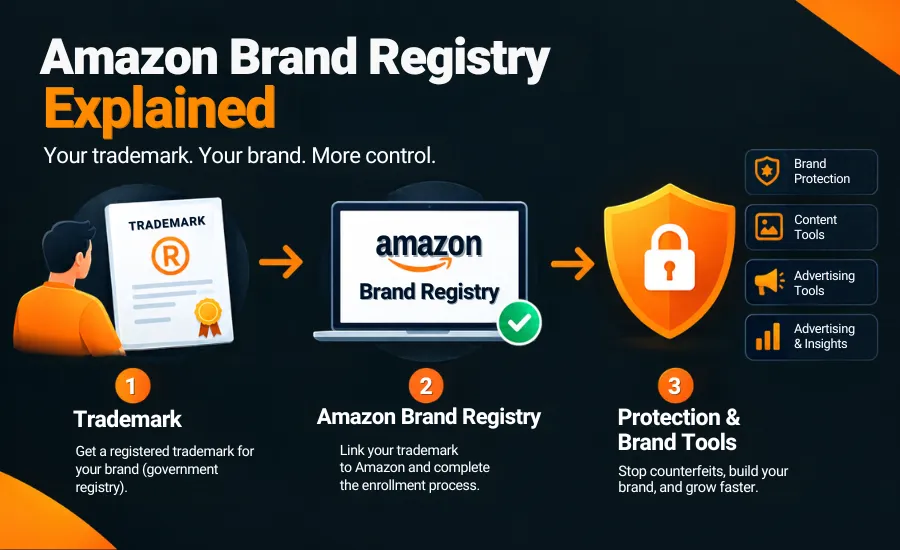
Amazon Brand Registry is Amazon’s program for brand owners. You enroll a brand by linking it to a trademark, Amazon verifies that you own it, and you gain access to brand-protection and brand-building tools. You can enroll even if you do not yet sell in the Amazon store.
It is different from a seller account. A seller account lets you list and sell products. Brand Registry says who owns the brand and unlocks tools tied to that ownership. It does not guarantee sales, rankings or the removal of every unauthorized seller. It gives you better tools to act on valid problems.
Is Amazon Brand Registration the Same as Amazon Brand Registry?
Yes, in practice. Amazon Brand Registry is the official name of the program. Amazon Brand Registration is the phrase many people type when they mean enrolling a brand in it. You will also see “brand enrollment” (or “enrolment” in UK English) and “Amazon registered brand”. This article uses Amazon’s official term and covers all of them.
One thing to keep apart: registering a trademark with a government office and registering a brand with Amazon are two separate processes with two separate owners. More on that below.
The Three Jobs of Brand Registry: Ownership, Protection and Growth
The program makes more sense when you read it as one sequence:
Trademark / eligibility → enrollment → verification → brand protection → brand tools → brand growth
- Ownership. Who owns and controls the brand on Amazon? Your trademark, matched to your application, answers that.
- Protection. How do you identify and report potential IP misuse? Tools such as Report a Violation sit here.
- Growth. Which tools help you present, advertise and measure the brand? A+ Content, Stores, Sponsored Brands and Brand Analytics sit here.
Most mistakes come from skipping straight to step three without getting step one clean.
Who Can Enroll in Amazon Brand Registry?
Brand Registry is for the trademark owner: private label sellers, manufacturers selling their own branded products, and businesses with an established brand. If you are an authorized agent, such as an agency or employee, Amazon’s guidance is that the trademark owner enrolls the brand and then adds you as an additional user. A plain reseller of other people’s brands does not qualify unless it owns trademark rights for the brand.
If you are dealing with copycats or misuse of your brand name, enrollment is usually the first practical step, because the reporting tools sit behind it.
Amazon Brand Registry Requirements
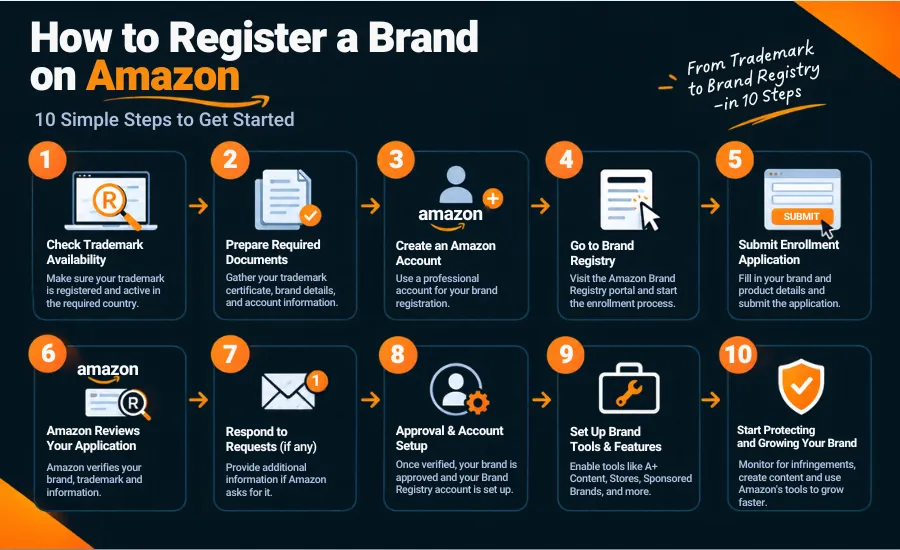
Based on Amazon’s current US page, you need:
- A logo that includes your brand name, permanently affixed to your products or packaging. You provide a standalone logo image and an image showing it on the product or packaging.
- A trademark for your brand name or logo, active and registered, or pending, issued by the designated trademark office of a country with a corresponding Amazon store. Amazon notes that in some cases you can enroll with a pending registration, and points to country-specific requirements.
- To be the trademark owner.
- The right mark type: a word mark (text) or a design mark (image with words, letters or numbers).
- Text that matches. The trademark text must match the brand name on your application. For image marks, the image you upload should match the trademark record exactly.
- The registration or application number from the trademark office.
- A list of product categories for the brand.
- Seller or Vendor Central credentials (if you have them), which you use to create your Brand Registry account.
Do You Need a Trademark for Amazon Brand Registry?
Short answer: Yes. Brand Registry is built on trademark ownership. What changes by country and by route is whether a pending application is enough.
Trademark vs Amazon Brand Registry
| Trademark | Amazon Brand Registry |
|---|---|
| Legal IP right | Amazon’s brand-owner program |
| Obtained from a government trademark office (for example USPTO or UKIPO) | Enrolled through Amazon |
| Establishes trademark rights | Gives brand-protection and brand-management tools on Amazon |
| Exists outside Amazon | Relevant to Amazon stores |
| Needed as the basis for eligibility | Requires meeting Amazon’s own enrollment rules on top |
Having a trademark does not enroll you. Being enrolled does not give you trademark rights.
Pending trademarks and IP Accelerator
This is where guides disagree. Amazon’s own US and UK pages say a pending or registered trademark can qualify, and add that country-specific requirements apply. Some third-party guides say pending applications work only when filed through Amazon IP Accelerator, a program that connects you with vetted law firms. Others say registered only.
The safe way to read it: a pending application may be enough in some countries and routes, IP Accelerator is the route Amazon promotes for brands without a trademark, and a pending mark that is later refused by the trademark office can put your enrollment at risk. If you have neither, plan for the trademark first.
How to Register a Brand on Amazon
- Confirm trademark eligibility. Check that your mark is a word or design mark and is registered or pending with an eligible office.
- Prepare your brand information. Brand name exactly as it appears on the trademark record.
- Gather what you need. Trademark registration or application number, logo file, photos showing the brand on the product or packaging, and your product categories.
- Get your account ready. Use the same credentials as your Seller or Vendor Central account if you have one. Use a company email you control, not a personal inbox that one person owns.
- Start enrollment. Sign in at the Brand Registry portal and choose to enroll a brand.
- Enter trademark details. Select the trademark office. Amazon’s FAQ says you pick one country-based office at enrollment and can connect trademarks from other offices after approval.
- Add brand and product information. Upload the logo and product images and list the categories.
- Complete verification. Amazon verifies that you control the trademark, often through a code sent to the trademark’s contact details. Follow the instructions in the portal.
- Wait for review. Track the status on the Brand Applications page. Amazon says approval can take several weeks or longer, with no fixed guarantee.
- Access your tools. Once approved, set up users and roles (read Seller Central user permissions vs SPP permissions before you give an agency access), then review the protection and brand tools.
Need help with Amazon Brand Registry? If your trademark details, ownership structure or US/UK situation make this unclear, The We One can review your setup and handle the enrollment process: Amazon Brand Registry assistance.
Verification, Delays and Rejected Applications
How verification works
Amazon needs proof that the person enrolling controls the trademark. In most cases that means the contact details attached to the trademark record, which is why mismatched ownership details cause trouble. Exact steps can differ by trademark office. Follow what the portal shows rather than a guide’s screenshot.
Common problems
- Trademark text does not match the brand name entered on the application.
- Image mark mismatch. The uploaded logo differs from the trademark record.
- Owner mismatch. The trademark is held by a person but the Amazon account belongs to a company, or the reverse.
- Applicant is not the owner. An agency applied instead of asking the owner to enroll.
- Incomplete or incorrect details, such as the wrong registration number or missing categories.
- Wrong marketplace or office. The trademark is not from a country with a corresponding Amazon store, or you applied in a market your trademark does not cover.
- Pending application issues, for example the application is not yet visible in the trademark office’s public records, or was filed outside an eligible route.
- Brand name on the packaging differs from the trademark.
- Delayed verification because the trademark’s contact email is out of date.
- Confusing trademark registration with Brand Registry, then waiting for a result nobody has requested.
What to do if your application is rejected
Start with Amazon’s stated reason, which is more useful than any general list. Then check, in this order: trademark number and office, exact brand-name match, owner details, uploaded images, and categories. Amazon lets you edit an unsubmitted application, add documents to a submitted one, and copy and correct a rejected application. If the stated reason does not make sense, contact Brand Registry Support through the portal. There is no single universal cause, so avoid resubmitting the same data and hoping for a different answer.
What You Get After Enrollment
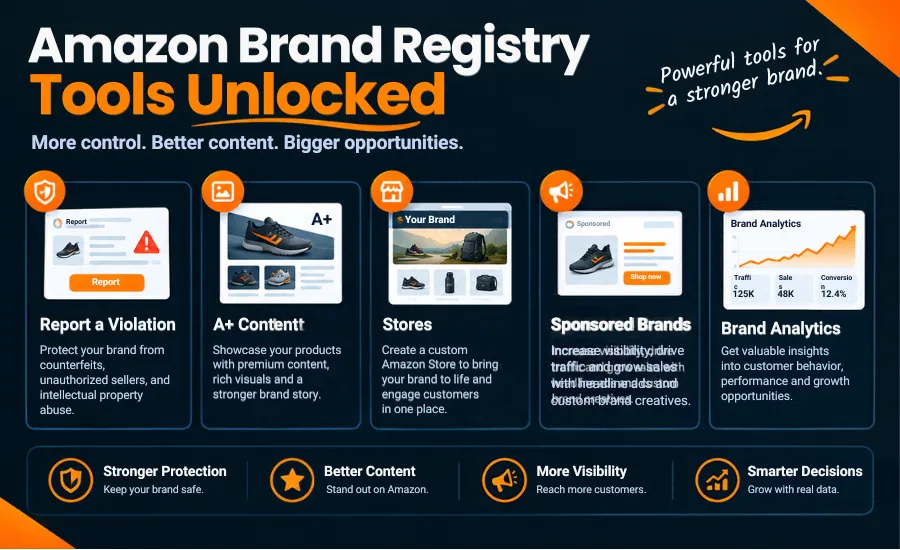
Enrollment unlocks tools. Each tool can have its own eligibility rules, so being in Brand Registry does not automatically mean every feature is available to you.
Brand protection tools
Report a Violation lets you report suspected IP infringement and other policy issues in one place. Amazon also lists Transparency (serial codes for authenticating units), Project Zero (the ability to block and remove listings, with its own eligibility) and its Counterfeit Crimes Unit. These tools help you identify and report potential violations. They do not eliminate counterfeits or remove a seller who is selling genuine goods without violating a policy. Our piece on how rogue sellers hurt brands and what can stop them goes deeper. Accuracy matters: filing weak or incorrect reports can create problems for your own reporting access.
A+ Content
A+ Content lets eligible brands replace plain description text with images, comparison charts, video and branded modules. If you want it designed rather than templated, see our Amazon A+ Content and Storefront design, or read our A+ Content guide first. Use it to answer buying questions, show use cases and keep the brand consistent across a catalog. It supports conversion; it does not by itself raise rankings. Amazon reviews A+ submissions before they go live.
Brand Stores
A Brand Store is a free, multi-page destination for your brand, built with templates and tiles. It gives you somewhere to send shoppers from ads and social traffic and to organize products by use case or collection. Amazon states that Store eligibility requires Brand Registry enrollment.
Sponsored Brands
Sponsored Brands ads let you feature your logo and several products in search placements. Amazon’s UK page notes it requires Brand Registry enrollment. If you are weighing ad types, see Sponsored Products vs Sponsored Brands vs Sponsored Display. Brand Registry gives you access; the ad performance still depends on keyword structure, creative, bids and the listings behind the click. Your Amazon PPC set-up matters more than the eligibility, and the campaign structure matters most. Our guide to Amazon PPC campaign structure walks through it.
Brand Analytics
Brand Analytics gives enrolled brand owners search and purchase data at no extra charge, with reports such as search query performance and top search terms. Our Brand Analytics guide covers the reports in detail. Used well, it shows which searches lead to your products and where you lose clicks or conversions, which feeds both listing edits and ad targeting. Pair it with our Amazon listing SEO checklist when you rework titles and bullets.
Amazon Brand Registry vs Amazon Seller Account
A seller account is for selling. Brand Registry is for brand ownership. One does not replace the other, and most serious brands use both. You do not need Brand Registry to sell on Amazon, but without it you have fewer ways to act when others misuse your brand or edit your listings.
Cost and Timeline
Brand Registry itself is free. Costs to plan for sit around it:
- Trademark filing fees charged by the trademark office, usually per class.
- Legal help, including IP Accelerator law-firm fees if you use that route.
- Optional services such as help with enrollment or brand management.
- Advertising, if you later run Sponsored Brands or other ads.
Timeline depends on your trademark status, whether details match, whether verification goes smoothly, Amazon’s review queue and the marketplace. Amazon says approval can take several weeks or longer once you have a trademark. Getting the trademark itself can take far longer than the Amazon step. Anyone who quotes a fixed number of days is guessing.
Amazon Brand Registry for US and UK Sellers
| United States | United Kingdom | |
|---|---|---|
| Trademark office | USPTO | UKIPO |
| Amazon’s wording | Pending or registered; “in some cases” pending registration; country-specific requirements | Same two requirements on the UK page, though the page also says “active registered trademark” in one place |
| Coverage | Trademark is country-specific; connect each office you need | A UK mark is needed for UK coverage; an EU mark filed after Brexit does not automatically cover the UK |
| Spelling you will see | enrollment | enrolment |
| Practical tip | Match owner name to the trademark record | Check whether the mark is held personally or by your limited company |
One Brand Registry account can cover multiple countries, but you add trademarks office by office, and protection follows trademark coverage. If you sell in both markets, plan the trademark filing in both. Always confirm today’s rules in the Brand Registry portal.
Amazon Brand Registry for Private Label Sellers
Private label sellers are the most common Brand Registry users. The brand is the product’s identity, so ownership, listing accuracy and the ability to report copycats matter early. Typical steps: settle the brand name, search for conflicts, file the trademark (or use IP Accelerator), enroll, then build the listing assets: A+ Content, a Store and an ad structure that points to them. Naming the brand before you check trademark availability is a common and costly shortcut.
Brand Registry Is One Part of Amazon Growth
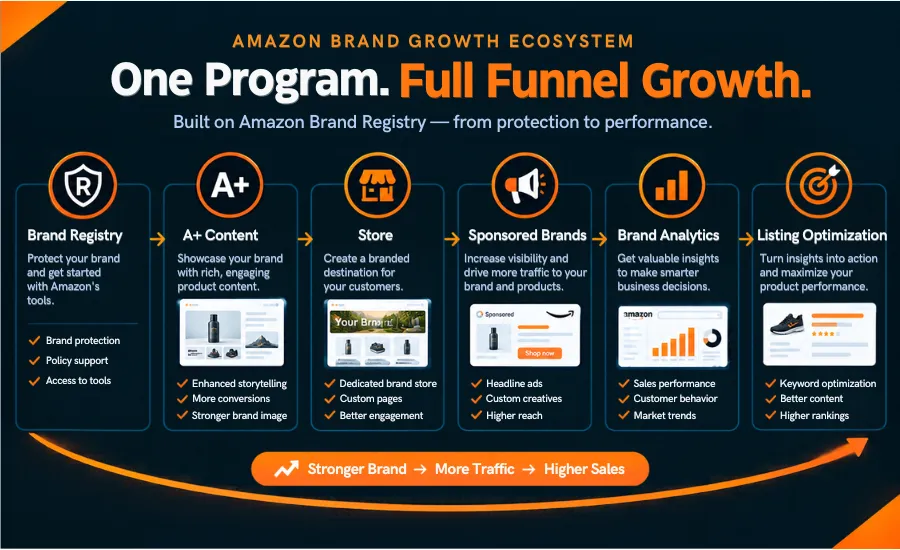
Enrollment gives you access, not results. A brand that is registered but still has weak titles, thin images, no A+ Content and chaotic campaigns will not sell more because of a Brand Registry badge. The growth sequence looks like this:
Brand ownership → protection → better presentation → A+ Content → Brand Store → advertising → analytics → listing optimization → growth
Most brands then need keyword research, listing optimization, Amazon SEO, PPC, photography, conversion work, reviews, inventory control, pricing and reporting. That is where the pieces connect: Brand Analytics shows what shoppers search, your listing is rewritten around it, and your Amazon PPC campaigns are built to match. If listings are the weak link, Amazon listing optimization is the next place to look, and if rankings are slow, Amazon SEO covers keyword indexing. Ads that outrun stock waste money, so Amazon inventory management belongs in the same plan. If ACoS is your concern, start with our guide to Amazon PPC optimization to cut waste and scale profits. For catalog and variation problems, see Amazon catalog management, and for visibility in AI shopping search, read how to get found on Amazon AI search (Rufus and COSMO).
Want hands-on help turning Brand Registry into growth? Get professional Amazon Brand Registry assistance.
Amazon Brand Registry Checklist
Before applying
- ☐ Brand name confirmed
- ☐ Trademark number and office confirmed
- ☐ Owner details match the trademark record
- ☐ Amazon account ready (company email)
- ☐ Logo and product/packaging images ready
- ☐ Product categories listed
- ☐ US/UK requirements checked in the portal
During the application
- ☐ Brand name typed exactly as on the trademark
- ☐ Image mark matches the record
- ☐ Verification completed
- ☐ Amazon’s instructions followed
After enrollment
- ☐ Users and roles set
- ☐ Other countries’ trademarks connected
- ☐ Protection tools reviewed
- ☐ A+ Content, Store, Sponsored Brands and Brand Analytics eligibility checked
- ☐ Brand assets standardized across listings
- ☐ Listings optimized
15 Common Amazon Brand Registry Mistakes
- Confusing trademark registration with Brand Registry enrollment.
- Using different brand spellings across trademark, packaging and listings.
- Entering the wrong trademark number or office.
- Ignoring country differences.
- Applying without checking current eligibility.
- Submitting incomplete information.
- Skipping verification steps or using an inbox no one monitors.
- Assuming approval is automatic.
- Assuming Brand Registry stops every infringement.
- Letting an agency or employee enroll in their own name instead of the owner’s.
- Leaving listings unoptimized after enrollment.
- Never setting up available brand tools.
- Ignoring Brand Analytics.
- Treating Brand Registry as the whole growth strategy.
- Not monitoring the brand after enrollment.
Handle It Yourself or Hire Help?
| Doing it yourself | Professional help |
|---|---|
| Lowest direct cost | Experience with common failure points |
| You control every step | Help with documents and matching details |
| Requires reading Amazon’s current rules | Structured enrollment process |
| You resolve issues yourself | Troubleshooting if an application is rejected |
| Fine for a straightforward single-brand application | Useful for complex cases |
If you want ongoing support beyond enrollment, full-service Amazon account management covers listings, ads and inventory.
DIY usually works when you own the trademark personally or through the same entity that holds the Amazon account, the names match exactly, and you have one brand and one market.
Outside help may be worth it (see what an Amazon agency actually does before you decide) when eligibility is unclear, the trademark is held by a different entity from the seller account, an application was rejected or is stuck, you have several brands, you sell in both the US and UK, you have limited Amazon experience, or you want enrollment connected to listing, A+ and PPC planning.
Want to build and protect your Amazon brand? Talk to The We One.
Amazon Brand Registry FAQs
What is Amazon Brand Registry?
Amazon’s free program for trademark owners that provides IP reporting tools, enhanced content, advertising options and analytics.
Is Amazon Brand Registration the same as Amazon Brand Registry?
Yes in practice. “Registry” is the official name; “registration” is the common search phrase for enrolling.
What are the requirements?
A brand name or logo permanently on the product or packaging, a pending or registered trademark from an eligible office, trademark ownership, matching brand details, the registration or application number and a category list. Confirm current rules in the portal.
Do I need a trademark?
Yes. Whether a pending application is enough depends on country and route, including IP Accelerator.
How do I register my brand on Amazon?
Confirm eligibility, gather trademark and brand details, sign in to the Brand Registry portal, enter the trademark information, upload images, complete verification and wait for review.
How long does it take?
Amazon says approval can take several weeks or longer after you have a trademark. There is no guaranteed time.
How much does it cost?
Enrollment is free. Trademark fees, legal help and advertising are separate costs.
What are the benefits?
Tools for reporting IP violations, plus access to A+ Content, Brand Stores, Sponsored Brands, Brand Analytics and other programs, subject to each program’s own eligibility.
Does Brand Registry protect against counterfeits?
It helps you identify and report potential violations. It does not remove every counterfeit or unauthorized seller.
What if my application is rejected?
Read Amazon’s reason, check trademark number, name match, owner details and images, then edit and resubmit using the copy-and-correct option or contact Brand Registry Support.
What is the difference between a trademark and Brand Registry?
A trademark is a legal right from a government office. Brand Registry is Amazon’s program that uses that trademark to give you brand tools.
Should I hire an Amazon Brand Registry service?
Not always. A simple, single-brand application can be done yourself. Help is useful when ownership, rejection, multiple brands or US/UK coverage make it complicated.