
Amazon Refund: What Sellers Need to Know About FBA Reimbursements
An Amazon refund is money returned to a customer after an order is cancelled, returned or disputed. For a seller, that refund is a cost taken from your account, not money coming in. A reimbursement runs the other way: it is money Amazon pays you when it is responsible for a loss, such as lost or damaged FBA inventory or a wrong fee. This guide explains how the two differ, which refund-related situations can lead to a reimbursement, where to look in Seller Central, and how to recover money Amazon may owe you.
What Is an Amazon Refund?
An Amazon refund is a payment returned to a customer for an order. When a customer cancels, returns an item or has an order problem, Amazon records a refund transaction and, in most cases, deducts that amount from the seller’s account. For sellers, a refund is a financial event in Seller Central. A seller reimbursement is different: it is compensation Amazon pays to the seller for an eligible loss, such as FBA inventory it lost or damaged, or a fee it charged incorrectly. A reimbursement claim is the request a seller submits when Amazon has not already paid for that loss. The two terms are often mixed up, but they describe opposite flows of money.
What is an Amazon refund for sellers?
When sellers search “Amazon refund,” they usually mean one of two things: refunds their customers received (which reduce their revenue), or money they want back from Amazon. The first is a refund. The second is a reimbursement. Getting this right decides which report you open and which process applies.
Amazon Refund vs. Amazon FBA Reimbursement
| Concept | What happens | Who receives the money |
|---|---|---|
| Customer refund | The customer gets money back for an order | The customer |
| Seller reimbursement | Amazon compensates a seller for an eligible loss | The seller |
| FBA reimbursement | Amazon compensates a seller for an eligible FBA issue, such as lost or damaged inventory or a fee error | The seller |
| Refund-related discrepancy | A refund, return or inventory record does not add up, so there may be a loss worth investigating | The seller may seek recovery |
A customer refund does not automatically mean Amazon owes you anything. Most refunds are a normal cost of selling. A reimbursement opportunity only exists when the loss is Amazon’s responsibility under its current policy.
How Do Amazon Refunds Work for Sellers?
The path is similar for most orders:
- A customer places an order.
- Amazon processes and ships it (or you ship it, if you fulfil the order yourself).
- The customer cancels, requests a return or receives a refund.
- Amazon records the refund transaction.
- Inventory and financial records update. A returned FBA unit may go back to sellable stock, be marked unsellable, or be recorded in another status.
- The refund amount is deducted from your account balance.
- In some cases, a mismatch between the refund, the return and the inventory record creates a possible reimbursement.
Step 7 is the exception, not the rule. A customer who returns an item in good condition, and sees it restocked, usually costs you nothing beyond the refund and any fees involved.
FBA orders versus seller-fulfilled orders
On FBA orders, Amazon handles returns and issues refunds on your behalf, so you usually find problems by reconciling reports. On seller-fulfilled orders, Amazon may still issue a refund on your behalf in some situations. Amazon’s Seller Assurance for E-Commerce Transactions (SAFE-T) program lets sellers request compensation when a refund deducted from their account was not their fault. SAFE-T claims have their own eligibility rules and filing window. Amazon keeps discretion over what it pays, so a claim is a request, not a guarantee.
What Is Amazon FBA Reimbursement?
FBA reimbursement is the compensation Amazon pays a seller when something goes wrong with inventory or fees while the seller is using Fulfillment by Amazon. Once your units are inside Amazon’s fulfillment network, they are in Amazon’s care. If a unit is lost, damaged by Amazon, or never recorded after you shipped it in, or if Amazon charges the wrong fee, you may be eligible for money back.
Three points matter:
- Reimbursement is about Amazon’s responsibility, not about customer satisfaction.
- Amazon pays some cases automatically. Others only surface when a seller reconciles data and files a claim.
- Eligibility, deadlines and how Amazon values the item are policy details that change. The most important recent change is the shift toward valuing some lost or damaged inventory using your item cost rather than the selling price. Our Amazon FBA reimbursement guide tracks the current rules, so this article does not restate them.
What Does Amazon Reimburse Sellers For?
Eligibility depends on Amazon’s current policy and the facts of each case. These are the usual categories.
Lost inventory
Units that disappear inside the fulfillment network and are never found or recorded as sellable.
Damaged inventory
Units damaged by Amazon’s handling in a fulfillment center or during Amazon’s own transport. Damage caused by the customer is treated differently.
Customer return discrepancies
Situations where a customer was refunded but the item was never received, was received in a different condition than recorded, or was not returned to your inventory.
Inbound shipment discrepancies
Units you sent to Amazon that were received short, or not at all, compared with what you shipped.
Removal-order issues
Units you asked Amazon to remove or dispose of that never arrived or were not accounted for.
Fee discrepancies
Fees charged that do not match your product’s actual size, weight, tier or the rate that should have applied.
Other eligible FBA-related losses
Amazon’s policy lists further cases. Check the current list in Seller Central rather than relying on a blog post, ours included.
None of these is automatic. “Lost” and “damaged” have specific meanings in Amazon’s records, and a missing unit is not always one Amazon owes you for.
Amazon FBA Lost or Damaged Inventory Reimbursements
Inventory moves through receiving, storage, picking, packing and returns. Every step creates a record, and records sometimes disagree with reality. A unit might be scanned in, moved between locations, picked, and never recorded as shipped. In reconciliation, that unit shows up as a discrepancy.
The seller’s job is to compare what Amazon says you have against what you sent, sold, had returned and had removed. If the numbers do not reconcile, and Amazon has not already reimbursed the difference, you have a candidate for a claim. Good FBA inventory management makes this reconciliation routine rather than a yearly scramble.
Example (hypothetical): You send 200 units into FBA. Amazon’s receiving record shows 192, and no discrepancy is flagged. That is an inbound discrepancy worth checking against your shipment and carrier records, not a guaranteed reimbursement. The outcome depends on proof and on Amazon’s current policy.
Avoid trusting any deadline or valuation formula you read online, including older guides that mention 18 months, until you have checked Amazon’s current wording.
Amazon Customer Returns and Seller Reimbursements
This is where most confusion starts, so here it is plainly: a customer refund is not automatically a reimbursement to the seller.
Typical scenarios:
- Item returned and restocked as sellable. Normal outcome. You pay for the refund and carry on. No reimbursement.
- Item returned damaged by the customer. Generally treated as a cost of selling, so it is usually not reimbursable.
- Customer refunded but the item never comes back. Amazon’s policies cover some of these cases, with conditions. This is worth checking in your returns report.
- Item returned, then lost or damaged by Amazon. Can become an FBA inventory reimbursement case.
- Item received in the warehouse but not shown in your inventory. A reconciliation issue.
The important question is not “was I refunded?” but “whose fault is the loss, and does Amazon’s current policy cover it?” Return reasons and statuses in your FBA returns data help answer that. Return volumes also swing with the calendar and the category, so see our notes on Prime Day returns, managing returns across FBA and FBM and selling shoes without getting crushed by returns.
Amazon FBA Fee Errors and Refund Opportunities
Fees can also create money-back opportunities. Review:
- Fulfillment fees: charged by size tier and weight.
- Storage fees: monthly and long-term charges.
- Referral fees: a percentage tied to category and price.
- Dimensional weight and size-tier errors: a product measured larger or heavier than it is.
- Duplicate charges.
A common cause is incorrect product dimensions in Amazon’s catalog record. If those dimensions are wrong, you may be overcharged on every unit sold. Not every fee discrepancy qualifies for reimbursement, and Amazon may check your declared dimensions against its own measurement. Treat fee review as an investigation first and a claim second. Clean catalog data prevents many of these errors, and seasonal charges such as the holiday peak fulfillment fee are worth checking line by line.
How to Find Amazon Refunds and Reimbursements in Seller Central
Seller Central menus and report names change, so confirm the current navigation before following any step-by-step guide. The data you generally need falls into these groups:
- Transaction and payments data: shows refunds, fees and reimbursements as financial events.
- Settlement reports: the detailed payout records.
- Reimbursement information: lists reimbursements Amazon has already paid, including automatic ones.
- Inventory records: the inventory ledger and inventory reports show unit movement.
- Customer returns reports: show returned units, reasons and dispositions.
- Fee reports: show what you were charged and on which units.
- Account activity and cases: show claims already submitted.
Before concluding Amazon owes you, cross-check at least two of these. A unit that looks missing in one report is often accounted for in another.
How to Claim an Amazon FBA Reimbursement
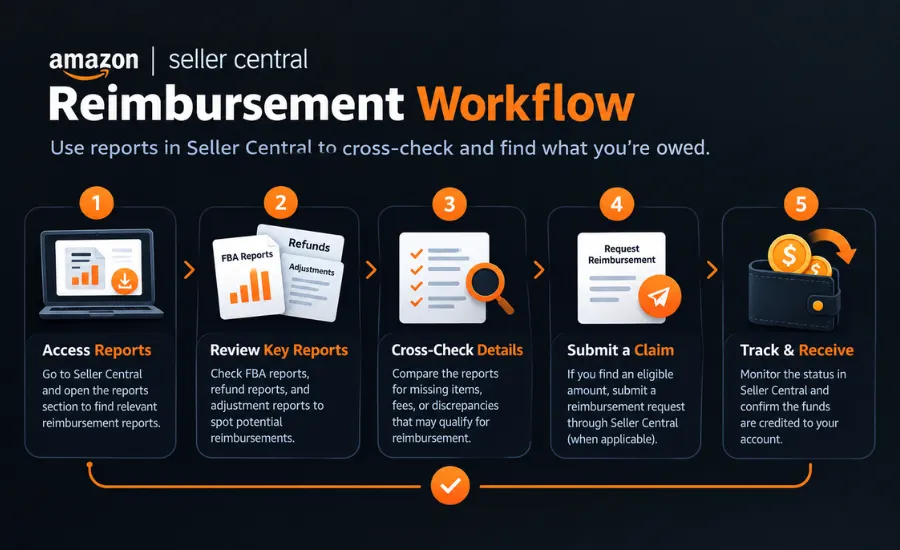
The exact process depends on the issue and Amazon’s current policy. The general workflow:
- Identify the issue. A missing unit, a return that never came back, a suspicious fee.
- Verify the record. Check the transaction, inventory movement or shipment it relates to.
- Check whether Amazon already reimbursed it. Automatic reimbursements are easy to miss and cause duplicate claims.
- Verify current eligibility. Read Amazon’s present policy for that issue type.
- Gather support. Shipment records, invoices, item cost records, screenshots, report excerpts.
- Submit the claim when required. Use the route Amazon specifies for that claim type.
- Monitor the case. Keep case IDs and dates.
- Respond to Amazon. Provide what it asks for, concisely.
- Verify the money. Confirm the reimbursement appears and matches what you expected.
Do not rely on a blog’s deadline. If you are unsure whether you are within the window, check the policy you can see today and act promptly. Our Amazon FBA reimbursement guide covers the current claim rules in detail.
Why Amazon Sellers Miss Refunds and Reimbursements
Most missed money comes from volume and complexity, not carelessness:
- Large transaction counts make manual review slow.
- Many ASINs and shipments multiply the places discrepancies can hide.
- FBA data is spread across several reports.
- Returns create their own tangle of statuses.
- Fee discrepancies are small per unit and easy to ignore.
- Policies change, so last year’s process may no longer work.
- Many sellers do not reconcile regularly, so old issues sit unnoticed.
There is also an assumption problem. Some sellers believe Amazon catches everything automatically. Automation covers some cases, but it does not replace reviewing your own account.
What Is an Amazon Reimbursement Audit?
An Amazon reimbursement audit is a structured review of your account data to find discrepancies that may be eligible for compensation. It generally includes:
- Inventory reconciliation: shipped, received, sold, returned, removed and lost units.
- Return analysis: refunds against return status and inventory outcome.
- Fee analysis: charges against product size, tier and weight.
- Shipment analysis: inbound shipments against receiving records.
- Transaction reconciliation: refunds, reimbursements and adjustments in the financial data.
- Claim identification: a prioritised list of discrepancies worth pursuing, after eligibility is checked.
Small accounts can do much of this by hand. Larger, higher-volume ones often find manual review impractical. An audit does not guarantee a recovery amount. It identifies what is worth investigating. Before giving any outside team access to your data, read how Seller Central user permissions compare with SPP permissions. If you want an audit done for you, you can request an Amazon reimbursement audit.
Amazon Refund and Reimbursement Checklist
Refunds
- ☐ Customer refunds reviewed
- ☐ Refund transactions reconciled
- ☐ Return records checked
Inventory
- ☐ Lost inventory reviewed
- ☐ Damaged inventory reviewed
- ☐ Missing inventory investigated
- ☐ Inbound discrepancies checked
- ☐ Removal activity reviewed
Fees
- ☐ Fulfillment fees reviewed
- ☐ Storage fees reviewed
- ☐ Referral fees reviewed
- ☐ Potential overcharges investigated
Reimbursements
- ☐ Existing reimbursements checked
- ☐ Potential missed reimbursements identified
- ☐ Eligibility verified
- ☐ Claims tracked
- ☐ Recovered amounts verified
15 Common Amazon Refund and Reimbursement Mistakes
- Confusing customer refunds with seller reimbursements. They are different money flows.
- Assuming every refund means Amazon owes you. Most do not.
- Not reconciling inventory. You cannot spot a gap you never measure.
- Ignoring return discrepancies. Refunded-but-never-returned cases hide here.
- Ignoring damaged inventory. Cause matters: Amazon-caused versus customer-caused.
- Ignoring lost inventory. Small unit counts add up across SKUs.
- Not reviewing FBA fees. Wrong dimensions can overcharge every sale.
- Ignoring inbound shipment discrepancies. Short receipts often go unchecked.
- Filing duplicate claims. Often because an automatic reimbursement was missed.
- Filing claims without verifying eligibility. Weak claims waste time and credibility.
- Using outdated Amazon policy information. Old windows and valuation rules still circulate online.
- Not checking historical transactions. Past issues may still be open to review.
- Failing to track claims. Without case IDs and dates, follow-up falls apart.
- Not verifying recovered amounts. Confirm the payment matches the claim.
- Assuming Amazon automatically catches every discrepancy. It does not.
Should You Handle Amazon Reimbursements Yourself or Hire a Service?
| Do it yourself | Professional service |
|---|---|
| Lower direct cost | Specialist knowledge |
| Takes your own time | Saves internal resources |
| Manual reconciliation | Structured audit |
| You file claims | Claims are managed |
| You track deadlines | Deadlines tracked by specialists |
| You need to know current policy | Policy knowledge is part of the service |
| Often fine for smaller, simpler accounts | Often useful for complex or high-volume accounts |
Several things are worth weighing: how much FBA volume you have, how many ASINs, how much time you can spend each month, and whether you trust your own reconciliation. Many sellers start by hand and move to help once volume makes it unmanageable. Services usually charge a fee or a share of recovered money, so ask about pricing structure before signing. If reimbursements are one part of a bigger backlog, full-service account management or a one-off review through Amazon FBA consulting may fit better than a reimbursement-only service.
When Should an Amazon Seller Use a Reimbursement Service?
Help is worth considering if several of these apply:
- You sell many ASINs or ship high FBA volume.
- You have unexplained inventory discrepancies.
- Returns are frequent.
- Your fee structure is complex.
- You have historical account issues.
- You suspect missed reimbursements.
- You lack time or internal resources.
- Seller Central data is hard to reconcile.
- You want continuous monitoring rather than a one-off review.
Need help finding missed Amazon reimbursements?
The We One’s Amazon reimbursement service covers reimbursement audits, inventory reconciliation, discrepancy identification, fee analysis, claim support and recovery tracking. We cannot promise a recovery amount, because what is recoverable depends on your account data and Amazon’s current policy.
FAQ
1. What is an Amazon refund?
Money returned to a customer for an order. For a seller it is usually deducted from the seller’s account.
2. What is an Amazon refund for sellers?
A refund the seller bears financially, or, in loose usage, money a seller wants back from Amazon. The latter is properly a reimbursement.
3. What is the difference between an Amazon refund and reimbursement?
A refund goes to the customer. A reimbursement goes to the seller when Amazon is responsible for a loss.
4. What is Amazon FBA reimbursement?
Compensation Amazon pays a seller for eligible FBA issues such as lost or damaged inventory or fee errors.
5. What does Amazon reimburse sellers for?
Typically lost or damaged inventory, some customer return discrepancies, inbound shortages, removal issues and certain fee errors, subject to current policy.
6. How do I claim an Amazon FBA reimbursement?
Identify the issue, verify the record, check whether Amazon already paid it, confirm eligibility, gather evidence, submit if required and track the case.
7. How do I check Amazon reimbursements in Seller Central?
Use the payments, reimbursement and inventory reports. Navigation changes, so check current menus.
8. Can Amazon reimburse sellers for lost inventory?
Sometimes, when the loss occurred while the item was in Amazon’s care and the case meets current policy.
9. Can Amazon reimburse sellers for damaged inventory?
Sometimes. Amazon-caused damage can qualify. Customer-caused damage generally does not.
10. Can customer returns result in seller reimbursement?
In some cases, such as a refunded item that never comes back or is mishandled by Amazon. A refund alone does not.
11. Why do Amazon sellers miss reimbursements?
Volume, scattered data, changing policy and irregular reconciliation.
12. Should I use an Amazon reimbursement service?
It depends on account size and your available time. Smaller accounts can often manage alone. Larger ones may benefit from specialist help.
Want to recover more of what your Amazon business may be owed?
Talk to The We One about a reimbursement audit.


