
Amazon Listings: How to Create, Optimize & Improve Product Pages
Last updated: October 2026
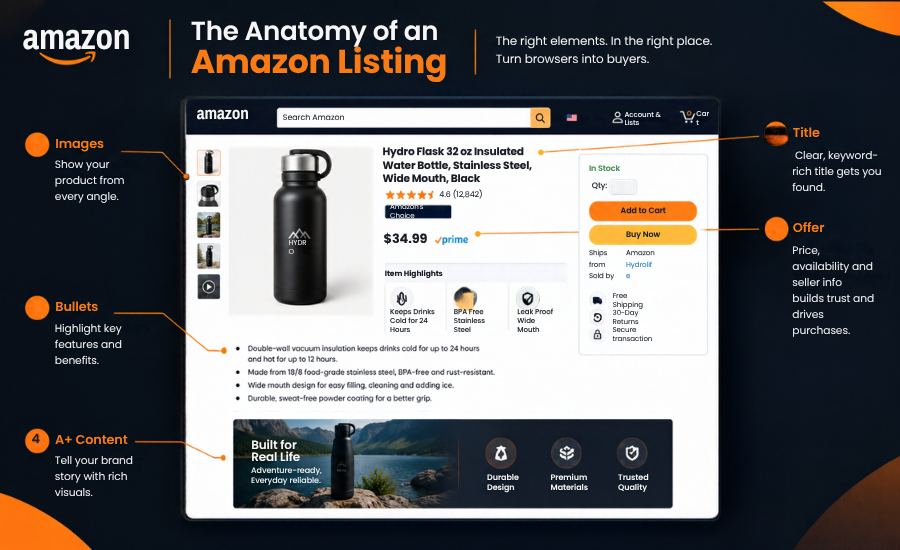
An Amazon listing is the product detail page a shopper sees, plus the seller offers attached to it. It has two jobs: help Amazon understand which searches your product should appear for, and help the shopper decide quickly that your product is the right one. Weak click or conversion versus competitors. If shoppers prefer the neighboring listing, visibility tends to follow them.
This guide explains what an Amazon listing contains, how to create one in Seller Central, and how to optimize each part, including the 75-character title rule Amazon began enforcing on July 27, 2026. It also shows how to tell a visibility problem from a conversion problem, and when it makes sense to bring in help.
What Is an Amazon Listing?
An Amazon listing has two basic parts: a product detail page and the offers paired with it. The product detail page shows the product itself: name, images, bullets, description and attributes. An offer is one seller’s terms for that product: price, shipping and promotions. When several sellers sell the same product, they share one detail page and compete through their offers, with one offer shown as the Featured Offer, often called the Buy Box.
Each product detail page is identified by an ASIN (Amazon Standard Identification Number). Brands enrolled in Brand Registry gain more control, because Amazon says only the brand and its authorized sellers can create or suggest updates to those pages through standard listing processes.
| Term | What it means | Who usually controls it |
|---|---|---|
| Product detail page | The page that presents the product | Brand owner, or Amazon’s catalog if no brand is enrolled |
| ASIN | The product’s identifier in Amazon’s catalog | Amazon |
| Listing content | Title, Item Highlights, bullets, description, images, A+ Content | Brand owner |
| Offer | Price, condition, quantity, shipping promise, promotions | Each seller |
| Fulfillment | FBA (Amazon fulfills) or FBM (you fulfill) | Each seller |
| Product information | Attributes such as size, color, material, dimensions | Brand owner, in the catalog |
The Two Jobs of an Amazon Listing
Think of a listing as doing two jobs in order. First it helps Amazon connect the product to the right searches. Then it helps a real person understand, trust and buy.
Amazon does not publish its ranking formula, and the names sellers use for it (A9, A10) are shorthand, not documentation. What Amazon does say is practical: use customer-friendly search terms, show accurate images, and give shoppers enough information to decide. Everything below follows that logic: search relevance, click, product understanding, trust, conversion, sales. If any link in that chain is weak, the rest of the work is wasted.
What Is Included in an Amazon Product Listing?
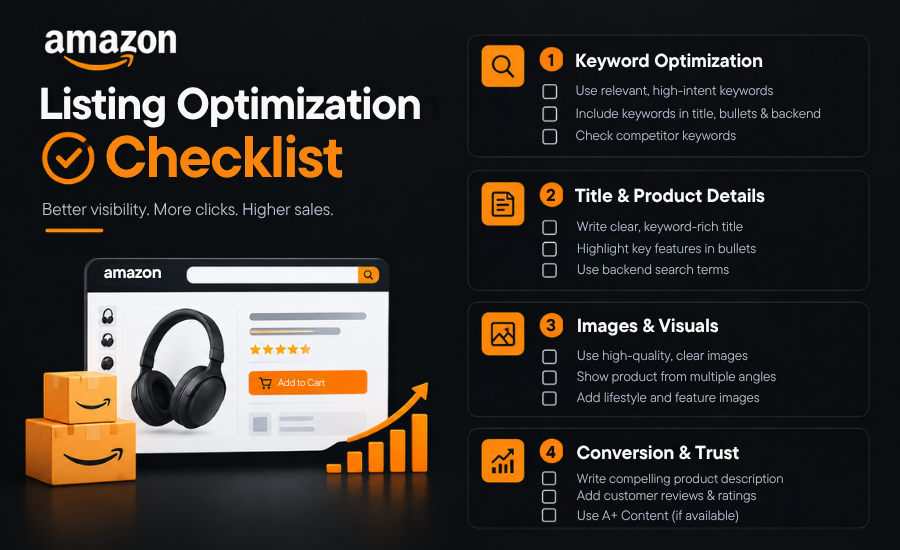
Required fields differ by product and category, so treat this as the typical anatomy.
- Title and Item Highlights: product identity, plus a searchable 125-character field for supporting detail (both covered below).
- Bullet points: up to five, according to Amazon’s seller guide. This is where features become benefits and objections get answered.
- Description: a broader overview. A+ Content appears in/replaces the plain-text Product Description area on the detail page. Amazon explicitly says the plain-text description is hidden when A+ is active.
- Images and video: up to nine photos per Amazon’s guide. Shoppers see these before they read.
- A+ Content: Current Amazon documentation also mentions certain generic ASINs and managed programs such as Launchpad/Amazon Exclusives.
- Backend search terms: Amazon recommends avoiding repetitions, but don’t present this as an absolute indexing law.
- Attributes: structured data such as size, color, material and dimensions.
- Variations: parent-child groups for genuine versions of one product.
- The offer: price, quantity, condition and fulfillment. A strong page with an unavailable or uncompetitive offer still loses sales.
How to Create an Amazon Product Listing
Amazon describes three steps: search for your product, fill out the product information, then save as a draft or submit. Preparation decides how smooth it goes.
- Research the product and category: Check whether the category needs approval or the brand is protected.
- Define the buyer: Who buys it, what for, and what worries them. Competitor reviews are the fastest source of objections.
- Research search terms: Use Amazon’s search suggestions, competitor listings and your ad data. Brands in Brand Registry also get Search Query Performance and Top Search Terms in Brand Analytics.
- Review competing listings: Note price and rating ranges, what main images show, and which questions nobody answers.
- Prepare product information: Gather the GTIN (UPC or EAN), dimensions, weight, materials and compliance documents. No GTIN? You may need an exemption.
- Create the detail page: In Seller Central go to Catalog, then Add Products, and enter the GTIN or product ID. If the product exists, match your offer to it instead of creating a duplicate. If not, choose Create a new listing.
- Write the title and Item Highlights: Keep the title within the current limit and move supporting detail into Item Highlights.
- Write benefit-focused bullets: Lead with what the buyer gains, then the feature that delivers it.
- Add the description and A+ Content. Use A+ only if your brand is eligible.
- Upload images and video: Plan each image to answer one shopper question.
- Add search terms, attributes and variations: Empty fields are missed information.
- Set the offer: Choose price, quantity, condition and fulfillment. For the FBM question, see our guide on which sellers benefit most from Amazon FBM.
- Review compliance: Add safety and compliance details where the product needs them.
- Submit and monitor: Save as a draft if anything is unverified. Once live, confirm the page shows what you entered, then wait for enough traffic to judge before changing more.
Amazon also offers generative AI tools that draft titles, descriptions and attributes. Treat the output as a first draft and check every claim against the real product.
How Amazon Listings Are Optimized for Search
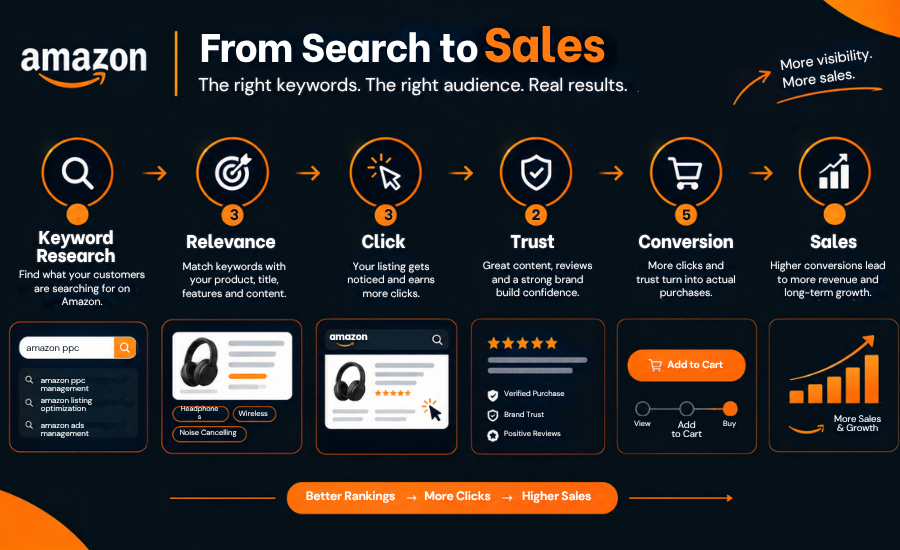
Search optimization follows a chain: keyword research, relevance, indexing, visibility, click, conversion. Keywords alone do not finish the job. A listing that matches the search but gets ignored in the results, or clicked and abandoned, still underperforms.
Keyword types and where they go
Sort your research into types, then give each type a home. Repeating a term across fields adds little. Avoid unnecessary keyword repetition. Place relevant terms where they naturally describe the product instead of repeatedly inserting the same phrase across listing fields.
| Keyword type | Illustrative example | Best home |
|---|---|---|
| Primary term | insulated water bottle | Title |
| Secondary term | stainless steel water bottle 32 oz | Title or Item Highlights |
| Use-case term | leakproof gym bottle | Bullets |
| Attribute term | BPA free, dishwasher safe | Attributes, Item Highlights |
| Synonym or alternate phrase | flask, tumbler | Backend search terms |
Search is becoming question-led
On May 13, 2026, Amazon renamed Rufus to Alexa for Shopping in the US, The official Amazon source confirms the rename, but I’d avoid the stronger “merging” wording unless you have a specific official source for that detail. At launch, Amazon described Rufus as trained on its product catalog and information from across the web to answer product questions and comparisons. The practical takeaway is modest: state materials, sizes, compatibility and use cases plainly, because shoppers increasingly ask questions instead of typing keywords. Other marketplaces may still show the Rufus name.
For UK sellers: the principles are the same, but check category rules in your own marketplace and use UK shopper vocabulary (trainers, nappies) in titles and search terms.
How to Optimize an Amazon Product Title
The title carries the product’s identity, so it has to work in search results, on a small phone screen, and in a quick glance.
The current rule. Starting July 27, 2026, titles in all categories except media must be 75 characters or fewer, including spaces, and the brand name counts. Amazon says this ensures the title fully displays on mobile. Titles still over the limit after that date are gradually replaced with Amazon’s AI recommendation, and brand owners get 14 days to review, change or approve it in Review Listings Changes. Earlier January 2025 style rules, such as limits on special characters and on repeating a word more than twice, may still apply, so check the guidance for your category and marketplace.
What goes in the title. Brand, product type, the single most important differentiator, and the key specification or pack size. Everything else moves to Item Highlights, bullets or attributes.
An illustrative example (not a real listing):
- Title (70 characters): AcmeTrail 32 oz Insulated Water Bottle, Stainless Steel, Leakproof Lid
- Item Highlights (97 characters): Keeps drinks cold 24 hours and hot 12 hours, fits most cup holders, BPA free, dishwasher safe lid
The performance figures are placeholders. Only publish claims your product can prove.
What to avoid. Promotional phrases, subjective claims such as “best seller”, and repeating words for ranking. Amazon’s help text reportedly shows Item Highlights only when the title is within the limit, so shorten the title first. Amazon says Item Highlights are searchable but has not published how much weight they carry.
When to change it and what to watch. Rewrite when the new rule affects the title, or when impressions or click-through rate fall behind similar products. Amazon’s current experimentation system actually supports multi-attribute experiments. For formal A/B testing, Amazon recommends sufficiently distinct variants.
How to Write Amazon Bullet Points That Convert
Each bullet should move from feature to benefit to buyer relevance. A feature is what the product has, a benefit is what the shopper gets, and relevance is why it matters to this buyer.
- Weak: Double-wall vacuum insulation.
- Stronger: Double-wall vacuum insulation keeps ice through a full workday, so your drink is still cold after meetings, the commute and the gym. (illustrative)
To make bullets earn their space:
- Lead with the decision driver: Competitor reviews show what buyers care about most.
- Answer objections: If reviews complain about leaks or sizing, say plainly how yours differs, with specifics you can support.
- Show differentiation: Say what is different from the product next to you.
- Use keywords where they read naturally: If a bullet sounds written for a robot, rewrite it.
- Keep it scannable on mobile, and check category rules for length.
Why Product Images Matter for Amazon Listings
The image earns attention before the shopper reads any copy. In search results, the main image and title are what people compare. On the page, the gallery answers questions bullets cannot show.
Plan each image to answer one question rather than repeating the same message: the product itself (main image, following Amazon’s requirements), the single main benefit, size and dimensions, the product in use, comparison or variants, what’s included, and trust or proof such as certifications, only if true.
Resolution matters because zoom helps shoppers inspect the product. Amazon’s guidelines measure size in pixels, not DPI. Do not copy image-slot rules from older guides, since they disagree with each other and with Amazon.
How A+ Content Improves an Amazon Listing
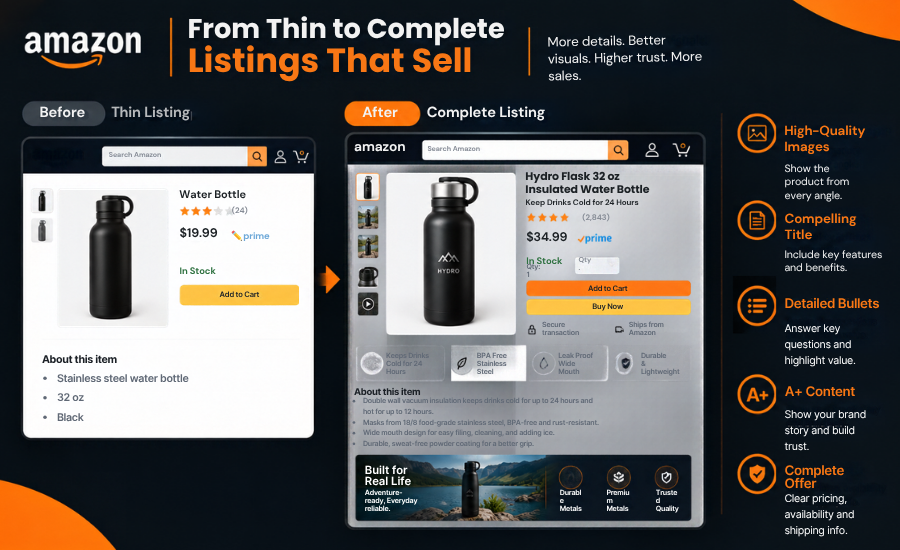
A+ Content lets eligible brands add videos, enhanced images, custom text placements and shoppable comparison charts. Amazon says it is available to brands enrolled in Brand Registry, so check eligibility first.
Used well, it educates shoppers on how the product works, compares your own products, handles objections the bullets cannot fit, builds brand trust, and cross-sells related items. It does not replace the first images or the bullets, because many shoppers decide before they scroll. Keep claims accurate and consistent with the rest of the listing. If you need a consistent look across listings, see our Amazon A+ Content and Storefront design service.
Amazon Backend Search Terms: What Sellers Need to Know
Backend search terms, also called generic keywords, are a hidden field in Seller Central. Shoppers never see them, but Amazon can use them for matching.
Limits. Amazon’s current US help says generic keywords are limited to less than 250 bytes. Your wording should say “less than 250 bytes,” not simply “250 bytes. Bytes are not characters: standard English letters cost one byte, while accented or special characters can cost two or more. If you exceed the limit, the field can be ignored.
What to put in:
- Synonyms and alternate names (flask for bottle)
- Spelling variations and abbreviations
- Terms that do not fit naturally in the visible copy
- Singular or plural, not bot. This is consistent with Amazon’s optimization guidance, but don’t imply every variation is universally unnecessary.
What to leave out:
- Brand names, including competitors
- Words already in your title, Item Highlights or bullets
- Irrelevant or misleading terms
- Common misspellings (Amazon’s guidance says use spelling variations, not common misspellings)
- Punctuation, repeated words and all-caps
Use lowercase words separated by spaces. Then check the current “use search terms effectively” guidance in Seller Central, since field rules can change.
Need help optimizing your Amazon listings?
If you would rather have keyword research, listing copy and A+ Content handled by a team that also manages PPC and catalog work, see our Amazon listing optimization service.
Your Amazon Listing Must Rank AND Convert
Search optimization helps Amazon understand “What is this product relevant for?” Conversion optimization helps the shopper decide “Is this product right for me?” A listing needs both, and each stage has its own controls and its own metric.
| Stage | What shapes it | Where to look |
|---|---|---|
| Visibility | Keywords in title, Item Highlights, bullets, attributes; correct category; availability | Impressions in Search Query Performance (Brand Analytics, if eligible) or ad reports |
| Click | Title, main image, price, rating, delivery promise | Click-through rate (clicks divided by impressions) |
| Understanding | Images, bullets, A+ Content | Detail page quality and shopper questions in reviews |
| Trust | Reviews, rating, brand content, consistency | Rating trend and review themes |
| Conversion | Offer, price, delivery, variation clarity | Unit Session Percentage (orders divided by sessions) in Business Reports |
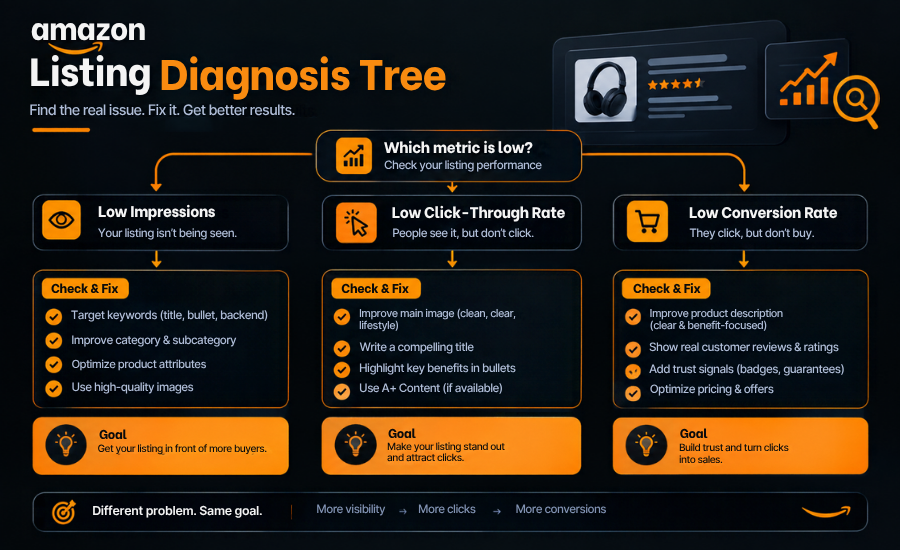
A three-way diagnosis keeps you from fixing the wrong thing:
- Few impressions. This is a visibility problem. Check whether the product is active and has the Featured Offer, then review relevance: title, Item Highlights, bullets, attributes, category and search terms. Do not rewrite images to fix this.
- Impressions but low click-through. This is a click problem. Compare your main image, title, price and rating to the products around you. Test one change at a time.
- Clicks but low conversion. This is a page problem. Review image gallery, bullets, A+ Content, reviews, price against alternatives, and variation clarity.
Compare your numbers with similar products and your own history. Brand Analytics offers market-level data to eligible brands. I am not quoting benchmark rates here because they vary widely by category.
Why Your Amazon Listing Gets Traffic but No Sales
When shoppers arrive and do not buy, the page, the offer or the traffic is usually the cause.
| Symptom | Likely cause | What to check | What to change |
|---|---|---|---|
| High views, low orders | Unclear value | Do the first three images and bullets state why to buy? | Rewrite for the main benefit, add a benefit image |
| Clicks from irrelevant searches | Targeting mismatch | Search term report for unrelated queries | Add negative keywords, tighten title relevance |
| Strong click rate, weak conversion | Page disappoints after the click | Main image vs gallery mismatch | Align promises, add use-case and size images |
| Price complaints | Price mismatch | Price vs comparable offers and rating | Review price, bundle or pack size |
| Hesitation in reviews | Poor reviews or thin proof | Review themes and rating trend | Fix the issue, add clarifying content |
| Wrong variation bought | Confusing variations | Variation names and images | Clean up the family, label clearly |
| Many questions asked | Insufficient information | Customer Q&A and review questions | Add specifics to bullets, images, A+ |
| Competitors convert better | Stronger offer or content | Side-by-side with top two competitors | Close the biggest gap first |
If you are paying for ads, weak conversion makes every click more expensive. Fix the page before raising bids. For the ad side, see our guide to Amazon PPC management.
Get an Amazon Listing Audit: If you can see traffic but cannot tell which stage is failing, our team can review the listing and the data together. Request a listing audit.
Why Your Amazon Listing Isn’t Ranking
No single factor decides ranking. Work through what you can verify, in this order:
- Inactive or no Featured Offer: Check Manage All Inventory for listing issues. A suppressed or inactive listing cannot rank.
- Not indexed for the term: Search your ASIN plus the keyword in Amazon search (a common seller check, not an official tool). If it does not appear, the term may be missing from your title, Item Highlights, bullets or search terms.
- Wrong category or incomplete attributes: Both can cause relevance and filters to miss the product.
- Weak click or conversion versus competitors: If shoppers prefer the neighboring listing, visibility tends to follow them.
- Low sales history in a competitive search: New products often need advertising and offer work alongside content.
- Variation or catalog problems: Broken variation families, duplicate ASINs or overwritten content split performance. See our catalog management service.
- Targeting irrelevant terms. Clicks without orders weaken the signals you want.
Amazon Listing Optimization Checklist
Keyword research ☐ Primary term identified ☐ Secondary terms mapped to fields ☐ Competitor terms reviewed ☐ Search intent understood
Title and Item Highlights ☐ Clear product identity ☐ Within the current limit for your category ☐ Key specifications included ☐ Supporting detail in Item Highlights ☐ Readable on mobile
Bullets ☐ Benefits are clear ☐ Objections addressed ☐ Differentiators explained ☐ Keywords read naturally
Images ☐ Strong main image ☐ Product clearly visible ☐ Lifestyle context ☐ Benefits shown visually ☐ Size and use cases shown
A+ Content ☐ Brand story ☐ Product education ☐ Comparison where useful ☐ Objection handling
Backend and attributes ☐ Relevant search terms ☐ Synonyms considered ☐ No stuffing or misspellings ☐ Attributes complete ☐ Current requirements checked
Conversion ☐ Offer competitive ☐ Reviews monitored ☐ Page matches buyer expectations ☐ Mobile view checked
15 Common Amazon Listing Mistakes
- Keyword stuffing: Hurts readability and adds nothing once a term is present.
- Writing for algorithms, not shoppers: Clicks still need a reason to buy.
- Weak titles: No product type or main differentiator.
- Feature-only bullets: Shoppers need the benefit.
- Generic images: Stock-style photos answer no questions.
- Missing use-case information: Buyers cannot picture using it.
- Ignoring backend search terms: Or filling them with repeats and misspellings.
- Copying competitor listings: You inherit their gaps.
- Ignoring customer objections: The answers are in the reviews.
- Poor variation structure: Confusing choices cost orders.
- Ignoring indexing: Assuming a term works without checking.
- Sending PPC traffic to weak listings: Paying for clicks the page cannot convert.
- Not testing changes: Changing everything at once hides what worked.
- Ignoring conversion data: Optimizing without looking at Unit Session Percentage.
- Not updating as rules and buyer language change: The July 2026 title change is the clearest example.
A Practical Amazon Listing Optimization Workflow
- Audit. Find where the listing loses people before changing anything.
- Keyword research: Build the term list from buyer language, not guesses.
- Competitor analysis: Learn what shoppers compare you against.
- Content strategy: Decide the main message and the objections to address.
- Copy: Write the title, Item Highlights, bullets and description.
- Visuals: Plan images and A+ Content around shopper questions.
- Technical review: Check attributes, category, variations, compliance and limits.
- Publish: Submit and confirm the page displays correctly.
- Monitor: Watch impressions, click-through rate and conversion once traffic allows.
- Test: Amazon says experiments do not impact search rankings. Your article currently implies testing can be used while watching ranking effects without making this distinction.
- Improve: Revisit when Amazon changes rules, buyer language shifts, or competitors move.
Should You Optimize Amazon Listings Yourself or Hire an Agency?
Both are reasonable. The right choice depends on how many products you have, how much time you can spend, and how complex the problem is.
| DIY | Professional service |
|---|---|
| Lower direct cost | Experienced Amazon expertise |
| Uses internal time | Saves internal resources |
| Requires Amazon SEO knowledge | Dedicated research process |
| You run the testing | Ongoing optimization |
| Limited outside perspective | Competitor analysis included |
| Manual execution | Structured workflow |
DIY makes sense when you have a small catalog, time to learn the tools, and a product in a simple category. Professional help tends to pay off when traffic is not converting, many ASINs need work, or listings must be right for a launch.
When to Hire Amazon Listing Optimization Help
Consider outside help when:
- Listings get traffic but few sales
- Organic rankings are weak
- PPC traffic does not convert
- Several ASINs need optimization
- Keyword research is incomplete
- Content is outdated, including titles affected by the July 2026 rule
- Competitors clearly outperform your page
- Your team lacks Amazon SEO experience
- A product launch needs a ready listing
- Existing listings need a systematic audit
The We One is an Amazon and ecommerce growth agency, and listings are one part of a connected system: keyword research, conversion-focused copy, A+ Content, competitor analysis, audits and ongoing optimization, alongside PPC, catalog and account management. That matters because a better listing sends more value into ads, and better ads give you cleaner data to improve the listing.
Want a stronger Amazon listing strategy? Talk to The We One. Book a free Amazon growth audit.
Frequently Asked Questions
1. What is an Amazon listing?
An Amazon listing is a product detail page plus the seller offers attached to it. The page shows the product’s title, images, bullets, description and attributes. Each offer shows a seller’s price, shipping and promotions.
2. What is included in an Amazon product listing?
A title, Item Highlights, bullet points, a description, images and video, A+ Content for eligible brands, product attributes, backend search terms, variations where relevant, and the offer (price, quantity, condition and fulfillment).
3. How do I create an Amazon listing?
In Seller Central, go to Catalog, then Add Products, and search by GTIN or product ID. If the product exists, match your offer to it. If it does not, create a new listing, complete the product information, set the offer, and submit. Some categories and brands need approval first.
4. How do I optimize an Amazon listing?
Research the terms buyers use, place them naturally in the title, Item Highlights, bullets and attributes, write benefit-led copy, build images that answer shopper questions, then monitor impressions, click-through rate and conversion and change one thing at a time.
5. How do I get my Amazon listing to rank?
Make sure the listing is active with an available offer, relevant to the terms you want, in the right category with complete attributes, and persuasive enough that shoppers click and buy. No single factor guarantees ranking.
6. Why is my Amazon listing not converting?
Usually an unclear main benefit, weak images, mismatched price, thin reviews, confusing variations or irrelevant traffic. Check whether the problem appears before the click (title, image, price) or after it (gallery, bullets, A+ Content, reviews).
7. What keywords should I use in an Amazon listing?
Use terms real buyers search that accurately describe the product: a primary term, secondary terms, use cases and attributes. Check Brand Analytics if you are eligible, Amazon’s search suggestions, competitor listings and your search term reports.
8. What are Amazon backend search terms?
A hidden field in Seller Central, also called generic keywords, that Amazon can use to match your product to searches not shown in your visible copy. Use synonyms and variations, avoid repeats and misspellings, and check the current limit for your marketplace.
9. What is A+ Content on Amazon?
A brand tool for adding videos, enhanced images, custom text and comparison charts to a product detail page. Amazon says it is available to brands enrolled in Brand Registry.
10. How often should Amazon listings be optimized?
There is no fixed schedule. Revisit a listing when Amazon changes rules (such as the July 2026 title change), when performance drops against similar products, when buyer language shifts, or when competitors improve.
11. Should I hire an Amazon listing optimization agency?
It can help if you have many ASINs, weak conversion, incomplete keyword research or a launch coming up. If you have a small catalog and time to learn, doing it yourself is reasonable.


